A free Gig Game account is all you need to start hosting. You will pick a user name, give an email address, and confirm that email with a short code. Your players never need an account.
#Before you start
- Use an email address you can open right now. Gig Game emails you a code to confirm it.
- You do not need a credit card to create an account.
#Create your account
-
Go to giggame.app and choose Create an account. You can also choose Start Free at the top of www.giggamestudios.com.
You will see the question What best describes you? with a set of tiles.
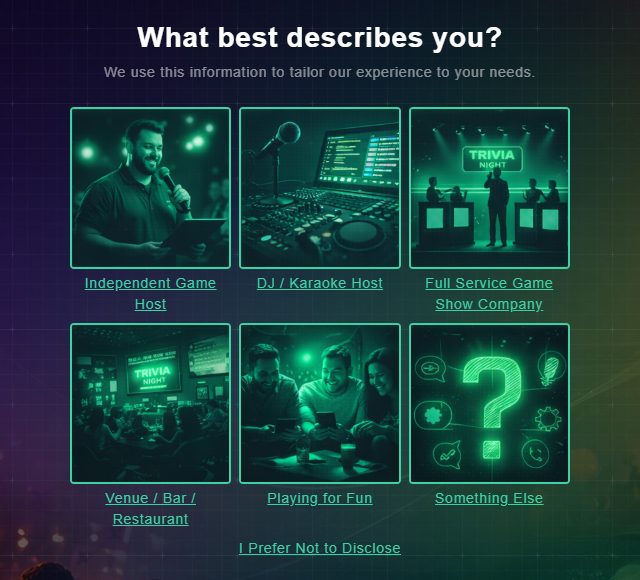
Choose the tile that fits you best. -
Choose the tile that fits you best: Independent Game Host, DJ / Karaoke Host, Full Service Game Show Company, Venue / Bar / Restaurant, Playing for Fun, or Something Else. If you would rather not say, choose I Prefer Not to Disclose.
The Create a Host Account form opens. Your choice only helps Gig Game tailor the experience to you.
-
Type the code from the picture into the Human test box. The code is valid for 10 minutes, so if the page has been open a while, reload it to get a new one.
This stops automated sign-ups.
-
Check the Language is the one you want, then enter a Username, your Email and a Password. Switch on View Password if you want to see what you typed.
The password is hidden unless you turn View Password on. All three of these are required.
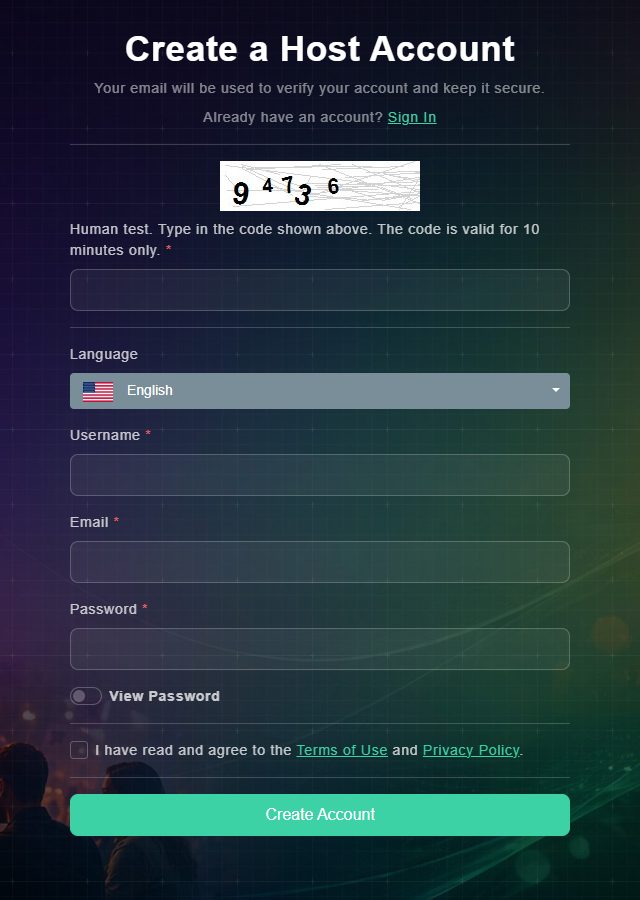
The Create a Host Account form. -
Tick the box that says you have read and agree to the Terms of Use and Privacy Policy, then choose Create Account.
The page changes to Email Verification and tells you a security code has been sent to your email.
-
Open your email, copy the 5-digit code, type it into Verification Code, and choose Continue.
You are signed in. The first thing you will see is Browse Games, the catalog of games you can host.
#What happens next
Take a look at the tour of the Host Hub to find your way around, then browse the Game Library and pick your first game.
#Common questions
Do my players need an account?
No. Players join from a QR code or a short access code, choose a name, and play. Only hosts have accounts.
Do I need a credit card to sign up?
No. You can create your account and host on the free plan without entering a card.
Can I change my user name later?
Yes, from Edit Profile. After you change it, it is locked for 60 days.