#Sign in
Hosts sign in at giggame.app. For your protection, Gig Game sends a one-time security code every time you sign in.
-
Go to giggame.app. You will see the Gig Game Host Sign In page.
The page asks for a Username and Password.
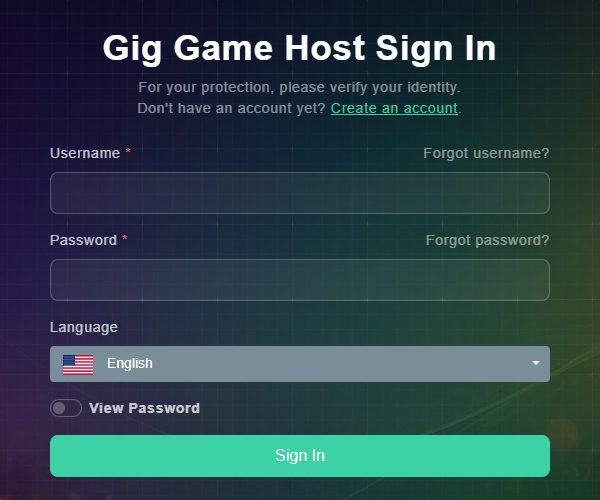
The Gig Game Host Sign In page. -
Enter your Username and Password. Check the Language, and switch on View Password if you want to see what you type. Then choose Sign In.
A security code is sent to the email address on your account (and by text message if you added a phone number). The page changes to User Verification.
-
Enter the code in Verification Code and choose Continue.
You are signed in and taken to your Host Hub.
#If you forget your username
-
On the sign-in page, choose Forgot username?.
You will see Forgot your username? with two tabs.
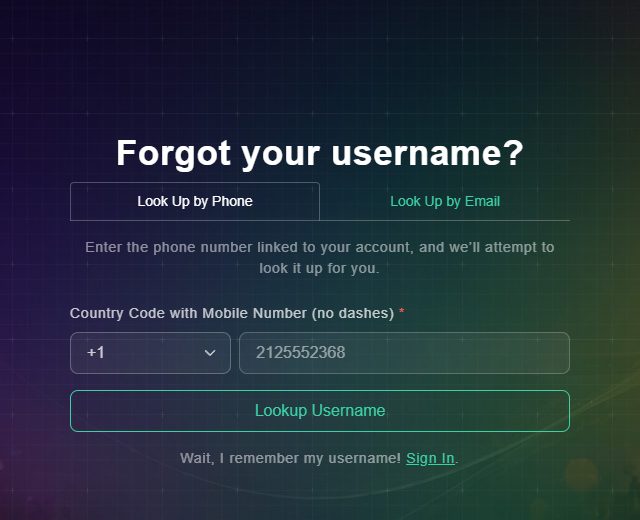
Look up your username by phone or by email. -
Choose Look Up by Phone and enter the country code and mobile number linked to your account, or choose Look Up by Email and enter your email address. Then choose Lookup Username.
If an account is found, you are taken back to the sign-in page with your Username already filled in. If not, you will see "We could not find an account linked to that email" (or phone number). If several accounts share your phone number, all of their usernames are listed.
#If you forget your password
-
On the sign-in page, choose Forgot password?.
You will see the Password Reset page.
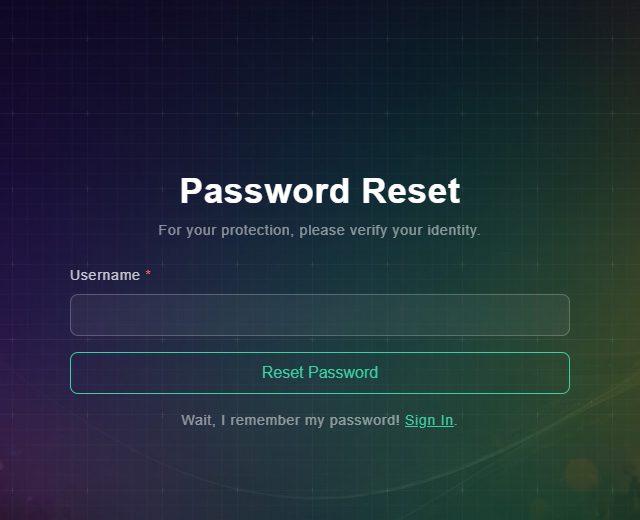
Reset your password with your username. -
Enter your Username and choose Reset Password.
A message with a new temporary password is sent to your email or phone. For your security, the page does not say whether an account was found.
-
Sign in with the temporary password, then change it from Edit Profile in the Host Hub.
Your new password is saved.