The Gig Game Host Hub is where you manage everything about your hosting. Once you are signed in, everything is reachable from the top bar and the sidebar on the left.
#The top bar

- The menu button at the far left shows or hides the sidebar.
- The Player Limit button (for example 3 Player Limit) shows how many players your plan allows in one game. Choose it to open Subscription.
- The messenger icon opens Messenger. A badge shows unread messages.
- Your name opens a menu with AI TOKENS, SETTINGS and LOGOUT.
#The sidebar
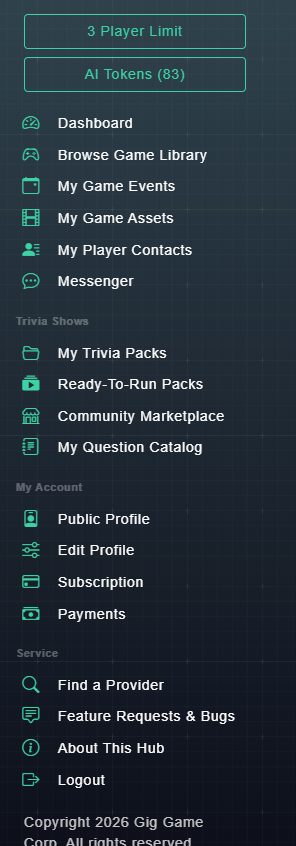
At the top are two buttons: your Player Limit and your AI Tokens balance. Below them, the menu is grouped by what you are doing.
| Menu item | What it is for |
|---|---|
| Dashboard | Your home page: totals, what's new, recent activity and quick actions. |
| Browse Games | The catalog of games you can host. |
| My Game Events | Your scheduled, running and finished events, and where you schedule a new one. |
| My Game Assets | Upload sponsor and advertisement images, audio and video to show in games. |
| My Player Contacts | Your contact list of players and leads, plus email tools. |
| Messenger | Send and receive messages with other Gig Game members. |
| My Trivia Packs | The trivia packs you have built. |
| Ready-To-Run Packs | Trivia packs made by Gig Game that you can play right away. |
| Community Marketplace | Trivia packs shared by other hosts. |
| My Question Catalog | Your personal bank of trivia questions. |
| Public Profile | The public page other people can see for you. |
| Edit Profile | Your account details: username, email, phone, language and password. |
| Subscription | Your plan and your player limit. |
| Payments | Receipts for what you have paid. |
| Find a Provider | A directory of hosts, DJs and venues running Gig Game. |
| Suggest a Feature | Suggest a feature, report a bug, and vote on other requests. |
| About This Hub | Information about the Host Hub. |
| Logout | Sign out. |
#Where to start
New here? Open the Dashboard for a guided look at your home page, then follow your first 30 minutes.