-
On My Question Catalog, tick the box beside each question you want. The header box ticks the whole page.
The count at the top reads, for example, 1 selected, and Create a Game Show Pack and Bulk Actions become available.
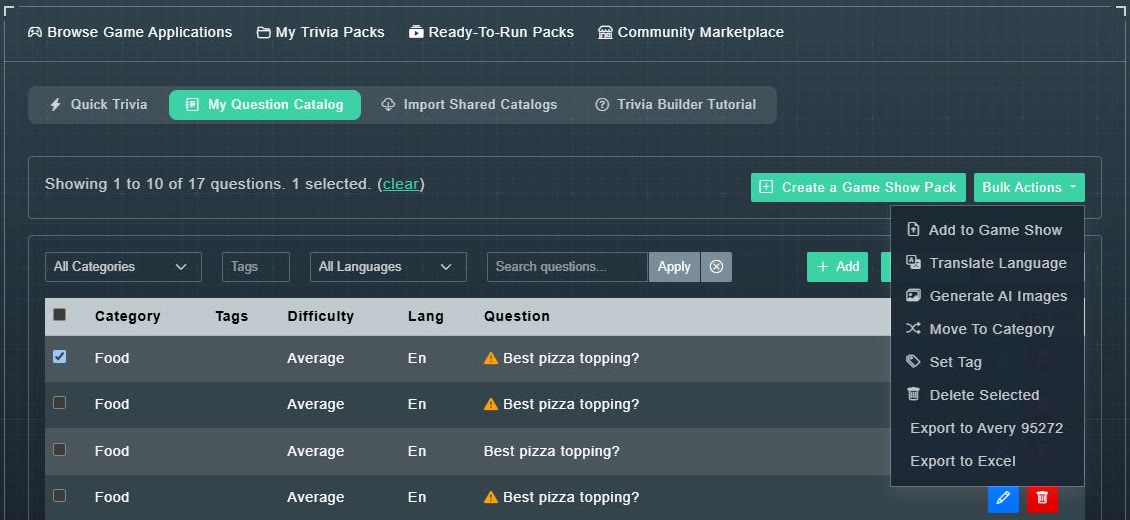
The Bulk Actions menu. -
Choose Bulk Actions, then an action.
The action is applied to every ticked question.
| Action | What it does |
|---|---|
| Add to Game Show | Copies the selection into a pack you are building. |
| Translate Language | Runs the selection through AI translation. |
| Generate AI Images | Makes a photo for each selected question that does not have one. |
| Move To Category | Sets the category on all of them. |
| Set Tag | Sets the tags on all of them. |
| Delete Selected | Deletes them permanently, after a confirmation. |
| Export to Avery 95272 | Print-ready flash cards, limited to 100 questions. |
| Export to Excel | A spreadsheet of the selection. |