-
On My Question Catalog, choose Add. To change an existing question, choose its blue edit button.
The Add/Edit Trivia Question window opens. A language menu at its top lets you write in another language.
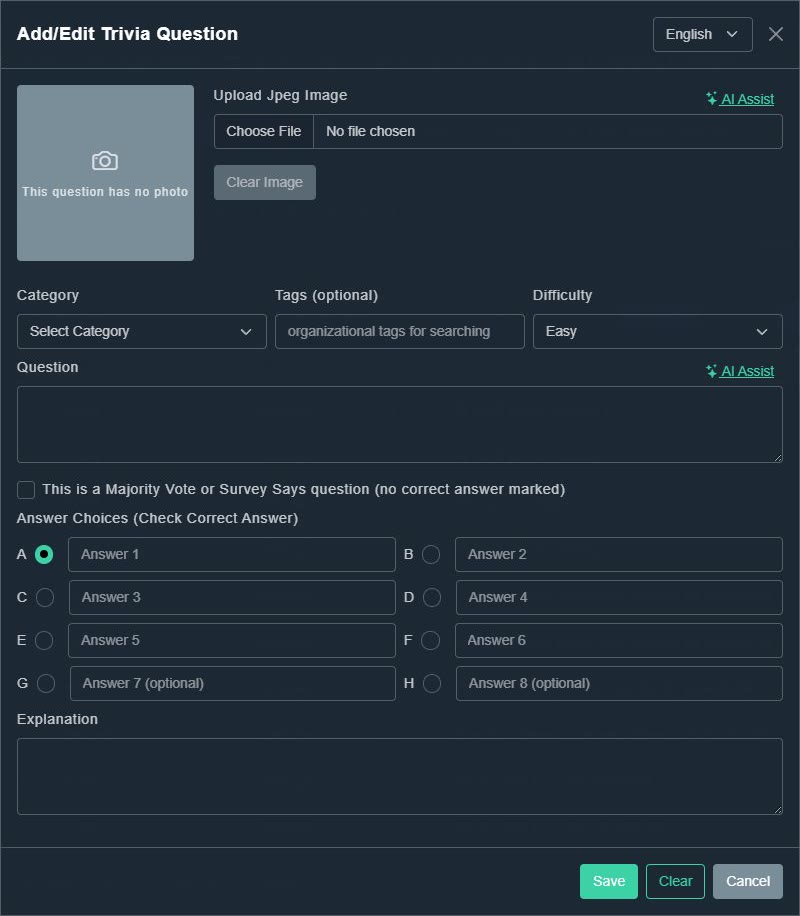
Add/Edit Trivia Question. -
Optionally add a photo. Choose Choose File to upload a JPEG, or choose AI Assist to generate one. Clear Image removes it.
The question shows its photo.
-
Pick a Category, add optional Tags (organizational tags for searching) and choose a Difficulty: Easy, Average, Hard or Expert.
The question is organized.
-
Type the Question. AI Assist beside it can write the whole question for you.
The question text is filled in.
-
Fill in the Answer Choices: answers 1 to 6, and optionally 7 and 8, lettered A to H. Tick the radio button beside the correct answer.
The correct answer is marked. The first answer is selected by default.
-
Optionally type an Explanation, which explains why the answer is right.
It is stored with the question.
-
Choose Save. (Clear empties the form and Cancel closes it.)
The question appears in your catalog.
Custom Trivia
How to write and edit a question
Every field in the question editor: photo, category, tags, difficulty, answers A to H, the correct answer and the explanation.
Still need help?
Create a free account to try Gig Game, or contact us if you have a question before you start.