The Rounds tab defines the structure of an Automated pack. Its help note says: Rounds define the structure and progression of a trivia set. Each round includes a name, target difficulty level, point value, and whether point decay is enabled, allowing you to control pacing, challenge, and scoring strategy.
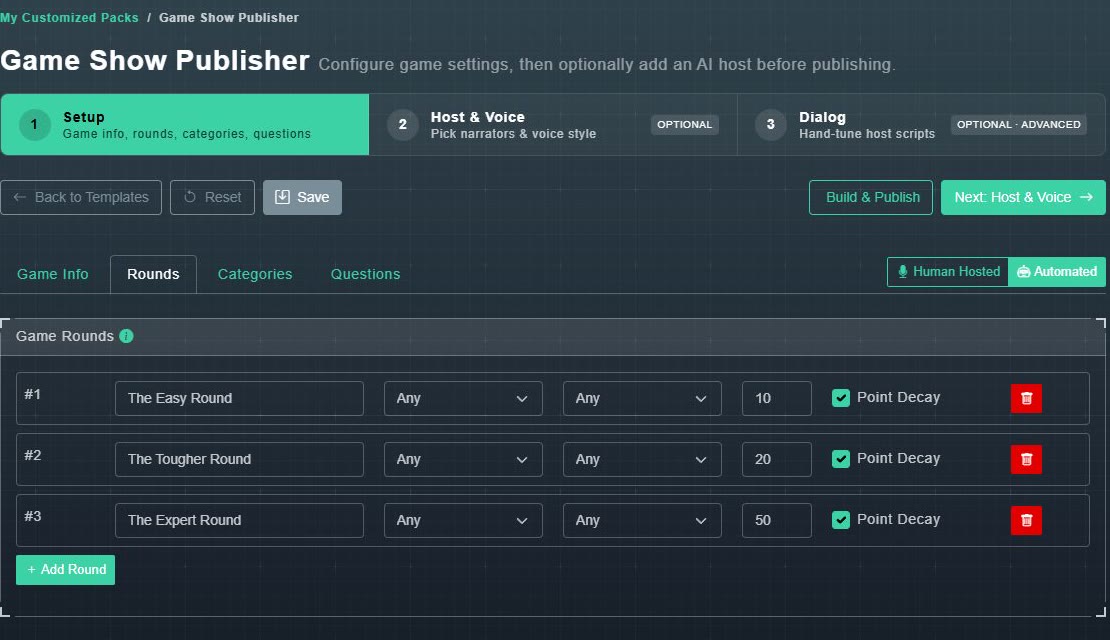
| Field | What it does |
|---|---|
| Round Name | What the round is called on screen. |
| Difficulty menu | Any, Easy, Average, Hard or Expert: the target difficulty for the round's questions. |
| Format menu | Any, Standard Questions, Bluff Questions, Majority Vote Questions (no right answer, players vote) or Survey Says Questions (ranked by popularity, players guess the order). |
| Points | The point value of the round's questions. A new pack starts with 10, 20 and 50 across three rounds. |
| Point Decay | When ticked, faster answers score more. |
| Red bin | Removes the round. A pack must keep at least one round. |
Choose Add Round to add another. Once a pack is published the fields are greyed out, so unpublish it to change them.