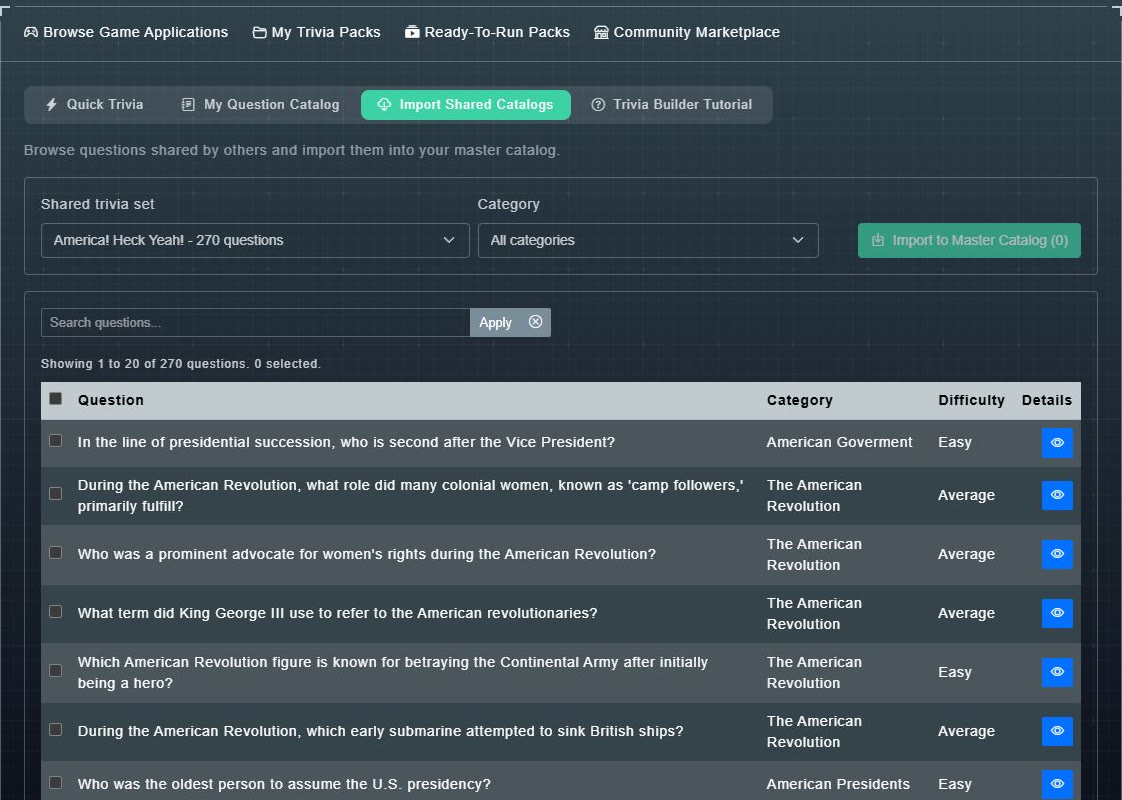
Import Shared Catalogs lets you browse the questions in trivia sets that Gig Game and other hosts have shared, and copy the ones you like into your own catalog. The page says: Browse questions shared by others and import them into your master catalog.
-
In My Question Catalog, choose the Import Shared Catalogs tab. (In the Marketplace, Import on a pack opens the same page.)
The page opens with a Shared trivia set menu, showing each set and how many questions it has.
-
Choose a Shared trivia set. Optionally narrow it with the Category menu or the Search questions... box, then choose Apply.
The questions are listed with their Category and Difficulty, 20 to a page. A count such as Showing 1 to 20 of 270 questions tells you how many there are.
-
Use the blue eye button on a row to preview that question in full.
You see its answers and explanation.
-
Tick the questions you want (or the box in the header for the whole page).
The button reads, for example, Import to Master Catalog (3).
-
Choose Import to Master Catalog.
The questions are copied into your Question Catalog, where you can edit them.