My Question Catalog in the sidebar is your permanent question bank. Everything you save here stays available for every set you build, not just the one in front of you.
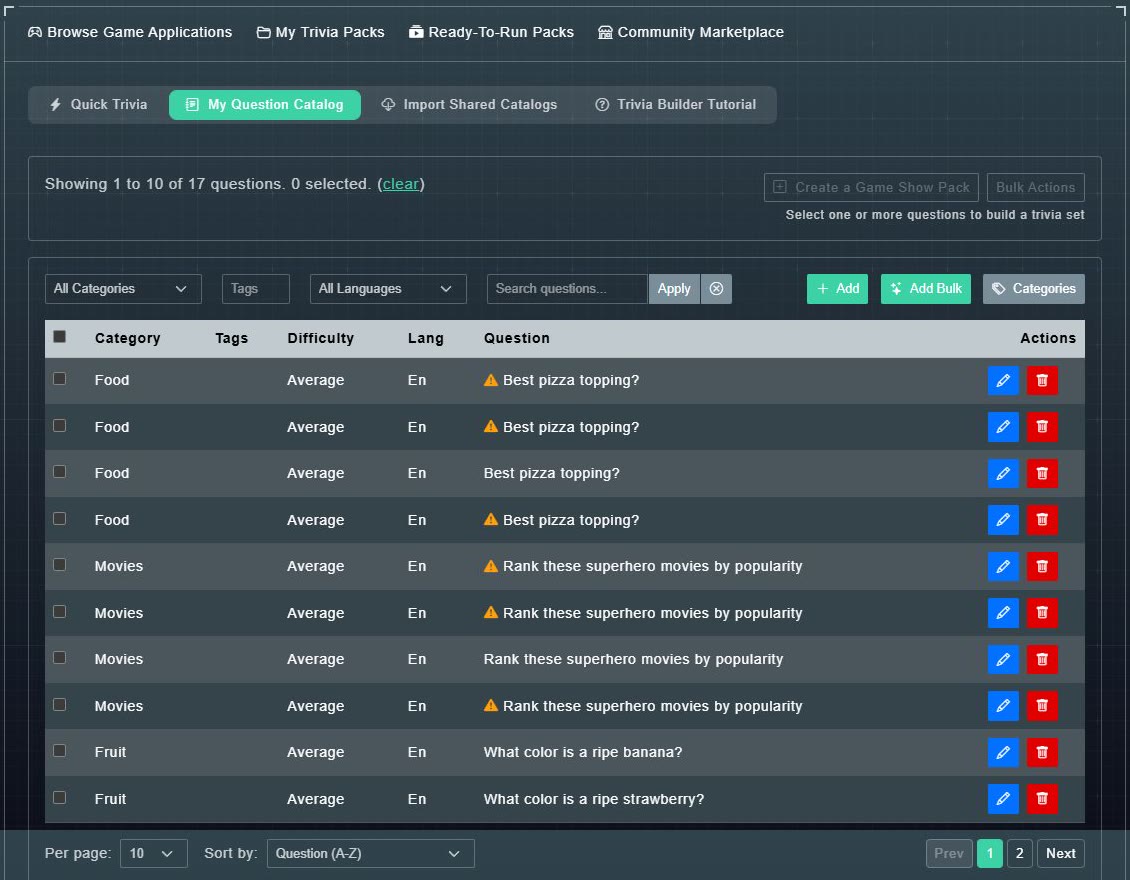
#What is on the page
- A count such as Showing 1 to 10 of 17 questions. 0 selected., with a clear link.
- Create a Game Show Pack and Bulk Actions, which wake up when you tick questions.
- Add, Add Bulk and Categories buttons.
- The table: Category, Tags, Difficulty, Lang and Question, with an edit button and a delete button on each row.
#Find a question
-
Use the filters above the table: a Category menu, a Tags box, a Language menu and a Search questions... box.
You can use any combination at once.
-
Choose Apply. (The circle button beside it clears the filters.)
The list narrows to matching questions.
-
At the bottom, set Per page (5, 10, 25, 50 or 100) and Sort by: Question (A-Z), Question (Z-A), Date Created (Newest First) or Date Created (Oldest First).
The list is arranged the way you want.